What is Git-Ops and when do we apply it?
Git-Ops is quite "hot" at the time of writing. Everyone is talking about Git-Ops and everything suddenly has to comply with it. To know if we can apply this, we first need to
know what it actually is.
Before we start talking about Git-Ops, it's important to know what principles underpin the automation project we're working on. Some of these principles are general and we are
going to start with them:
- Work from standards
- Keep It (Stupidly) Simple (KISS)
- Everything is automated, you can't touch the system anymore (Hands-Off IT)
- Users no longer have root access
- There's a playbook for everything
- Updates to systems and/or applications are carried out via code
- All code and configuration are in GIT
Based on the above principles, an update to a git repository will result in an update to a system or application. In principle, this is correct, but there are several conditions attached to it. Only if all conditions can be met, Git-Ops is an option. In many cases, Git-Ops doesn't apply at all, so before we start using the Git-Ops method, we need to see if it's a valid method for the work we're automating.
Of course, we do not let go of the fact that an application must be tested before it can be put into production. To this end, things will have to be set up to be able to guarantee this. This could include things like automatic testing and/or approval processes with manual steps. But the final execution to the systems will be automated. Whether it is started via Git-Ops (i.e. automatically) or manually is a choice that depends on what is in progress. Sometimes it is an organizational choice NOT to do it.
We are going to explain why these are necessary on the basis of the above general principles.
Standards
If you want something to be automated, the actions must always be the same as much as possible, this is only possible if you apply standards. It seems obvious, until you take a closer look at systems and then it often turns out that there are many differences. By automating the design of systems, you remove these differences and the management of those systems often becomes easier (read: more unambiguous).
It is also easier to connect for later additions, if you supply a standard system. If you build a house with standard building blocks, it is easier to place a roof straight on top of the house than if that wall is built with boulders.
KISS
Keep it Simple, Stupid basically says it all, but stick to it. You can put all the code to do a full deployment in 1 playbook, it works... If you ever have to make changes
to it, the misery often begins. Make playbooks modular (roles) and keep them small,
a role usually implements 1 service completely and nothing more, so it remains clear.
Merge roles in a playbook, make the execution of a role conditional if necessary.
To do this, take a look at the ansible best practices:
Hands-Off IT
Perhaps the most important of all, once you have arranged the automation, you no longer need to log in to the system. If there's something, a playbook is going to run to fix it. In most cases, manual intervention leads to undesirable deviations from the standard. In many organizations, many people have all kinds of 'rights' to the system, to be able to do things for applications, websites and other tasks. These rights are often 'abused' to solve issues quickly, which then never end up in the installation or documentation of the system. That's an undesirable anomaly... In the event of a reinstallation of the system after a disaster, it suddenly turns out that it no longer works, because the manual change has not been implemented in the installation scripts/playbook. So, if we always do this from the code, a reinstallation is "Always correct".
Systems without dynamic data can therefore also be flushed again to restore function. This means that a backup of these systems is no longer necessary. Because the code will always install this system correctly. For systems with dynamic data sets (such as databases), it must be considered on a system-by-system basis whether recovery via re-flushing is possible without data loss.
No root access for users
Users and administrators no longer have root access by default. For incident investigation, it must of course still be possible to log in and obtain 'root'rights, but this
must be enabled via a playbook, so that access is closed by default and the action to give access is logged (related to a ticket). If a cause of an incident is found, the
solution must be processed in code, so that it does not occur again next time, or can be solved via code, without logging in. The latter can be linked to (Event Driven Ansible)
at a later stage, so that no one is called out of bed for it.
This is not immediately accessible to a start-up organization but is a dot on the horizon.
There's a playbook for everything
As mentioned above, a playbook must be created for every action that is going to take place on a system. That seems like an exaggeration, but automation is all-or-nothing. If the answer is automation, then there must be a playbook for everything, otherwise it's not automated. We're shouting very loud playbook here, but any kind of scripting is basically okay. Just make sure you don't get too many flavors of scripting languages. Then it also becomes unclear/unmanageable.
Playbooks are launched via "pipelines"
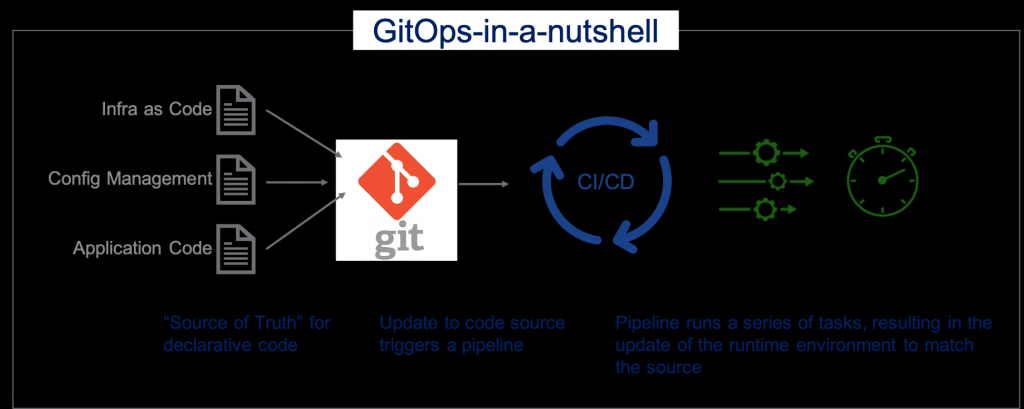
This is the starting point of automation. At the point when you must click somewhere to launch it, it's not automated. The fact that the start always must come from a pipeline (Git-Ops) may be very short-sighted, in any case no human should be involved, a starting assignment for a playbook can of course also come from an event (Event Driven Ansible). A pipeline provides the trigger on the code when an update is done on a git repository. This may be that a syntax check is automatically performed with each update. It is also possible that a configuration is made on a machine/application because a merge request has been made to a certain branch in git, the possibilities are endless.
In some situations, it is not always desirable to start automated playbooks, which will become clear on their own.
GitLab pipelines
GitHub pipelines
All code and configuration is in GIT
It should be clear, GIT is the source of truth when it comes to ansible code and configuration of systems and applications. For Git-Ops to succeed, the executing system (AAP) must be able to access the code to execute it. The code, in turn, must be able to read the configuration data (also via AAP and GIT), in order to be able to apply the configuration.
On this site we are not going to explain how you should deal with git, what is allowed and what is not. We assume that you have mastered the git processes and that you can apply what is described here in your own process or adjust your process in such a way that it does fit in.
Git-Ops
Actually, the description of Git-Ops is already elaborated in the above chapters, but for the sake of completeness we will do it again:
The definition of Git-Ops is as follows:
The code and configuration of a system or application is stored in GIT in such a way that every time the configuration changes, the code is automatically executed to implement the change on the system.
It goes without saying that a change will not be made immediately in the production environment and that this requires a GIT method that must be followed closely. The pipeline should also include safeguards to prevent untested changes from being brought to production.
Git-Ops is therefore mainly about configuration, the deployment code (ansible), follows a different release-based process.
DTAP
In fact, DTAP stands for the sequence of environments and procedures that a piece of software will go through during its development. Whether the process is automated or not, the sequence should be followed in the same order in almost every structured development and testing environment:
Develop:
Here, the developer/engineer is working with their hands in the code to implement the feature that is desired/required in the software or code. Whether that code is compiled
into a part of a larger package, or whether it's an ansible playbook, shouldn't really matter to the process.
When the developer is done with their work, the code should at least:
- Must be syntactically correct
- Be error-free compatible, if necessary,
- Error-free start
Documentation of the new feature has been added and reviewed.
The delivery of the software can then be taken to the next branch via a git merge request. The next step in the process will be testing. If this is done in a GitOps environment,
the pipeline will ensure that the software is installed/run in the relevant environment.
This is also the only environment where code can and may be modified to add new functionality.
Test:
In this phase, the software functionality will be installed in a limited and limited (test) environment and will be assessed for functionality by testing it and assessing the results of those tests. If it concerns a modification of existing software, the regression items are also tested here, i.e. whether no new errors are introduced in the already existing functionality by this update. Only when the software passes all these points can it move on to the next environment, the acceptance environment. If a problem is found in one of the functionalities of the software, it will have to be adjusted in the development environment and offered again in the test environment.
Acceptance:
Unlike the test environment, which is limited in systems and data, the acceptance environment is set up by a larger one and has a dataset similar to production. There are also connecting systems that may have dependencies (e.g. SOAP or API interfaces) with the system on which the software is installed. In this case, it is tested in relation to other systems whether there is no negative impact of the update, given the functionality of the modified software. Often, These types of tests are automated on a large scale, so that they can be repeated quickly and often with determined results, so that deviations will also be found quickly. Only when all tests in all previous environments have been successful, the software update is eligible to be put into production. This method provides great certainty about what is brought to the production environment.
Such a strict organization of environments is not necessary everywhere, but the steps are no different.
Again, if a problem is found with the software or the installation, an analysis must first be done in this environment. If the error is not found in the test environment, it will be related to one of the factors that are different in this environment than in the test environment. After analysis, the solution is also entered back into the development environment and will therefore have to go through the test environment again (where it can be useful to introduce this cause there as well).
Production:
The environment where the software is no longer tested, but used functionally. This assumes that the described functionality works and if that turns out not to be the case, a bug is logged with the creators. And in extreme cases, the previous, correctly working version will be restored. What should not happen here is that something is "fixed" quickly, although the temptation is sometimes great.
If the software is managed via git, you often see this structure in the branches of the git repository, this is not always necessary and can be simpler (fewer branches), but then you need different markings to keep the versions and updates apart. There is no obligation to use a particular method, but use one that is workable and understandable for everyone.