Configuring Ansible Automation Platform version 2.7
Rhaap version 2.7 has landed, upon installation the metrics server is added and for the containerized install, the metrics server parameters must be
added to the inventory file. After this the installation runs without problems.
The memory usage after installation is high (14GB of 16GB allocated to the machine), updated the machine to 24GB and rebooted. After reboot the base
(unconfigured system uses about 12GB).
Initially, I cloned all repositories, containing configuration as code, in the cloned repositories, I changed the variables, so it points to the new server.
I ran all the configuration as code pipelines, using the changes below.
This resulted in a fully functional Ansible Automation Platform version 2.7
The configuration as code described here is now completely rewritten to comply with rhaap version 2.7, it is more stable and runs without issues and is
able to recover a lost configuration. In previous versions of my configuration as code, I built the execution environments and uploaded these into the
automation hub. I changed this to an external (for rhaap that is) registry in my environment, so upon recovery I don't have to rebuild lost execution
images, these are still in my registry. This saves much time in recovery.
As with rhaap v2.6 (you might have noticed), custom collection uploaded to the hub (the published repo),
are not serviced by automation hub.
This is solved in this configuration version.
In this page I will describe all runs and changes to the files that were used to configure rhaap version 2.6, so I will end up with the same configuration as I had in version 2.6. You can upgrade from 2.6 to 2.7 preserving your data, but your configuration as code might become unuseable as means to recover. These pages might help you to get things back on track.
Installing containerized rhaap
This part of the site will tell you how I configured redhat automation platform version 2.7 using configuration as code. As there are stil a number of
issues with the configuration, I will describe the way around these issues when possible.
This is the description to setup a configuration as code from scratch for version 2.7 of the automation platform. If you have a different version, find
the appropiate version in the main menu.
Bu be aware that these older versions are not maintained, nor updated, they are still on the site as documentation of my configuration as code journey.
But first things first, I need to describe how the configuration that I am making is setup.
Disclaimer:
The configuration code I'll show you is created and functional for my homelab, servernames, credentials and so on are changed for security. There will be
no warranty that it will run "as is" on your system.
Do change those parameters accodingly.
This configuration is developed on my homelab and is actually used in a number of Enterprises, after the development was done and documented here.
I am not allowed to disclose the name of the organizations here.
Warning
As this configuration as code is reasonably complex when you have never seen this before. Start with just 1 file at a time and expand from there.
This will give give you the insight on how it works. You can throw it all in there at once, but the amount of errors might overwhelm you.
What is Configuration as Code
If you read the title, you might think that something is being recorded in program code, but of course we don't. It is not given to every administrator
to write programs. Configuration as code is a bit of a misleading term these days. Before the infra collection was available, this was of course somewhat
correct, because then the ansible code also had to be created to get the configuration into the system. Since the community has made the collection available
for this, the latter is no longer necessary, and we almost only record the content.
Yes, there is still a bit of code, that will be my gift to you, read on.
You can still ask several questions:
- What exactly do we record?
- Where do we record this?
- How do we record this?
- What do we do this for?
- What can we do with it?
We hope to answer these questions on this site and actually go a step further, by making a statement now:
"why should we backup automation platform?"
We are not going to answer that question, you can do that yourself after reading this site.
Spoiler Alert: Nothing beats a healthy backup plan
In the first instance, we will briefly summarize the answers to the above questions, the substantive and technical treatment will follow in later chapters.
What exactly do we record?
In configuration as code, we actually record everything that exists in terms of content in the automation platform. That is, "Anything we can fill in and click on in the user interface".
Automation platform 2.7 consists of 5 main components:
- Automation gateway
- Automation hub
- Automation controller
- Event driven ansible controller
- Automation metrics
For each component, we try to record everything that is part of the configuration in .yaml files, so that we can read it with ansible and load it back into the system via an API, for example. Now that's easier said than done, but here the community has already taken a lot of work off our hands by making the infra collections available, so that we no longer have to create that code to load it. Big thanks to the community.
In this site, we are going to make grateful use of the work that the community has done for us. In the context of "better to copy well than to have to sweat for it ourselves", we also use the community collections and we supplement them with some of our own ansible code plus some pipelines, which we will explain in full on this site.
But we would tell you exactly what we are capturing, there it comes.
Automation gateway
The automation gateway in version 2.7 is the main entrypoint for automation platform and all user configuration has been moved from the separate components to the gateway. This changes the configuration as code a lot since each component had its own user configuration.
In gateway we configure the following:
- Organizations
- Teams
- Users
- Access rights
- Authentication providers
- Team mappings
- User role mappings
- Team role mappings
- Applications
- Ports
Automation Hub
The automation hub is the interface for your internal organization to RedHat and community collections. The automation hub also determines which parts of the redhat and/or community collections will be made available to the internal organization. Your own custom collections and Execution Environments can also be stored and managed here. As a rule, an automation hub only exists once per environment (and can be configured to be high available) and the content can also be different per environment. The configuration of the automation hub is made for the benefit of the controller(s) that will be linked to it. This configuration only exists once per environment and is therefore the same for all controllers in that environment.
As already mentioned, we record this configuration data in yaml files and what do they contain:
- What repositories are there (both RedHat, Community and own)
- Which config is synced
- Which (redhat) token is used
- What exactly is synced
- What custom namespaces are there?
- Custom collections
- Execution environments
For the description of recording of this data, we refer to a later chapter. For a description of how automation hub works, see RedHat's online documentation.
Automation controller
The automation controller is the replacement for its predecessor ansible tower. This is the heart of your automation environment, where playbook runs are started,
planned and monitored. Without the controller (or similar platform), there is no real automation environment. For an automation controller, we can define the
following for each environment:
- credential types
- credential input sources
- credentials
- execution environments
- hosts
- instance groups
- inventories
- inventory sources
- labels
- Manifest (License)
- notification templates
- projects
- job templates
- roles
- schedules
- settings
- workflows
An automation controller is suitable to be used by multiple teams (organizations), each team can require a different setup with different inventories and credentials.
As a result, it is not convenient to record the entire configuration of the controller in 1 set of files. You could give each organization a separate set of
files within a repository, but then there is still a single responsibility.
If you want to make AAP users end-to-end responsible, you have to give all users access to the same repository and files, this will not give the desired result and
will be a major source of annoyance.
For the above reason, we have split the setup of the controller into several parts:
- Basic configuration
- Team configurations
As you can see later on this site, the basic setup only occurs once, it contains everything that needs to be set up on a global level, such as licenses, superusers, organizations, organization_admin accounts and more. We will discuss the content of this in another chapter.
Event driven ansible controller
Event driven ansible is introduced in automation platform version 2.6. It is used to gather events from monitoring, evaluating the event and then run a playbook(job template) to remediate the cause of the event. This way we can create a self-healing infrastructure.
For the event-driven ansible controller, a collection is now also available to record the configuration in code and then load it. In it, we record the
following data:
- credentials
- decision_environments
- projects
- rulebook_activations
For the description of the recording of this data, we refer to a later chapter. For a description of how Event Driven Ansible works, see RedHat's online documentation. On this site, you will find an example project for EDA. The ultimate setup would be to incorporate AI into EDA. This is not possible for my installation at this time, refer to the redhat documentation for more information.
Where do we record this?
In a large IT organization (Enterprise), we want to prevent configuration information from being spread over many systems and/or departments. Traditionally, IT departments within organizations were set up according to silos, where a lot of effort was put into keeping documents and knowledge within the department and hidden from other departments (indispensability principle). Nowadays, fortunately, this is no longer the case, because there are generally no passwords in the documents anymore, fortunately a certain security awareness has ensured that. But it is precisely this fragmentation of knowledge by the organization that has become (almost) fatal for many companies. At the time they were needed, the one who knew 'everything' was no longer employed, it had not been transferred... For these reasons, we really only want one place where the configuration is, a source with the truth, for which we use a version management system, in this case GIT.
We are talking about the configuration files and not the code. The code is maintained by the community and for that we only have 1 source of truth and that is ansible galaxy. We will come back to this in later chapters, which would be a possible setup for the git repositories, based on gitlab. For other git implementations, it shouldn't be that difficult to rewrite this with the knowledge you have of that git implementation.
How do we record this?
This is the question we want to answer on this site. The code we use to load the configuration enforces the standard here and we have to follow it. What we can do is play around with it before it is picked up by the code. That's what we're going to do on this site. In principle, each part of the configuration will have its own git repository from which the configuration can be pushed from code into the system. How this is structured will be explained in the following chapters.
What do we do this for?
There has never been an infallible system created by humans, so why should we bet that this will be different? That's why we do this, the moment something goes wrong somewhere and the configuration is lost for whatever reason, we need to be able to fix it as quickly as possible. So that the organization is not or hardly inconvenienced by the disruption. As an administrator, you can't explain nowadays that you can't fix a malfunction within a day. For many organizations, there is a major financial loss if the automation environment does not work. So cover yourself (not with excuses, but with recovery code)....
What can we do with it?
As mentioned in the previous section, we can define the configuration and have it pushed into the system via the code. But we've also said that the configuration will be set up in parts. If you then lose all configuration because your system has been completely wiped, you still have a lot of work to do and it also needs to be restored in the correct order. You can already feel it coming, we are going to automate this too, so that as a real IT person we can put our feet on the desk and shout:
"Look Mammy, No hands".
We're going to take you on a journey to automated recovery, as far as that's possible right now.
This should enable you to create a configuration as code for an automation platform 2.7 installation.
There is a lot of work to be done.
TIP Start small....
AAP in the organization
As the rhaap (redhat ansible automation platform) is the heart of your (automation)business, you want it to be secure, and the credentials not being shared with anyone in
the organization. You want to be able to separate credentials and other configuration items from teams that do not have a use for them.
Configuration as code is basicly done on a per organization basis, so for each organization there is exactly 1 configuration as code repository.
There are two ways to accomplish this:
Departments configuration and rbac
One way to implement a configuration is to give each department a "Team" in rhaap and set access rights for everything through the rbac model rights.
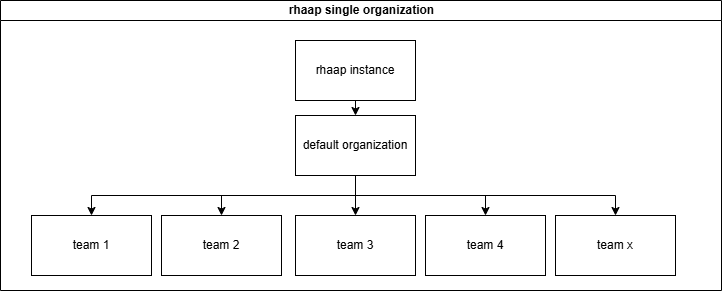
This means in practice that all the configuration is in one repository and the automation team is responsible for it all. This also means that changes are error prone, through
communication errors and so on.
This also means that teams cannot be responsible for their own work and how it is configured in rhaap, other that defining it through the UI (defeats the purpose of configuration
as code).
This configuration repository will become very large (hundreds of templates and projects) finding errors in a configuration that has thousands of lines is not easy with managers
behind you screeming "why is the automation service down?".
It also has a number of advantages, but I will not go into this way of configuring rhaap.
For small businesses, with limited automation needs, this is an option, but automation tends to grow.
Departments will be organizations in AAP
The other choice is to give each department its own organization, this implies that (almost) nothing is shared between the teams and this is exactly why these "teams" can
be in control of their own configuration.
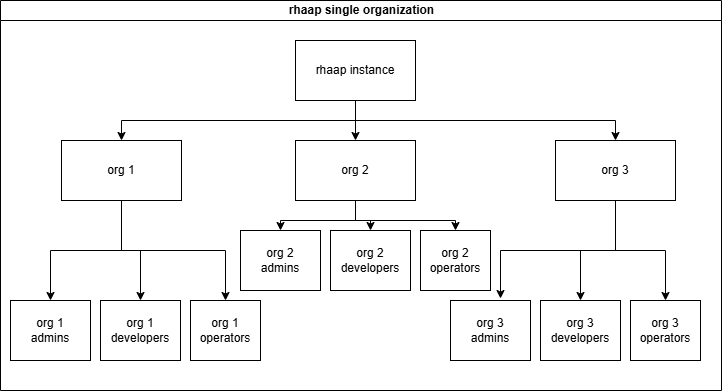
To be in control over your configuration, You need a separate repository for your configuration as code and a separate pileline to configure this into rhaap.
On the other hand, we want the base configuration to be controlled by the automation team and not polluted by user config.
This is exactly what we are going to build in these pages.
We made the following split in the configuration as code:
- The rhaap instance is the base configuration
- Each 'Organization' is a configuration repository in git
- The teams are managed inside the organization, but mapped from LDAP/AD
- RBAC is only needed inside each organization
- As from version 2.5 and up, it is possible to configure usage rights(RBAC) over organizations for objects
- EDA is configured here as an add-on for teams(organizations) that need EDA, and not given by default.
Users are part of Organization teams
Almost every user is mapped through AD/LDAP groups, there are a few exceptions we will discuss later. Access rights are granted through group membership (RBAC).
There are a few usertypes we will see here:
- SystemAdmins (superusers), these are the platform admins they can see and change everything.
- Organization Admins, they can change everything inside the organization they live in.
- Developers, they are granted rights by the organization admin to do their work on projects, templates, inventories and workflows within an organization.
- Operators, they are granted rights by the organization admin to run certain templates.
This is implemented in the documentation you'll find here. When you fully understand how this works, you can implement your own schema of users, or even combine roles to make things even simpler. Be my guest in doing so, it is your configuration.
So if You're interrested, keep on reading.
Gitlab and ConfigAsCode
To make full use of the gitlab features we need to use it as the source of thruth for our configuration as code, we have to explain how we organized things to make this work.
It all starts with organizing things and structuring it in a way that it is easy to understand, but also to be able to make use af the variable features gitlab gives us.
I'll show you the structure we use in gitlab and why, this is essential for our piplines to run.
The structure of groups and projects
From the gitlab root we created the following structure:
.
├── common_code
│   ├── cac
│   │   └── pipeline.yml
│   ├── code_dev
│   │   └── pipeline.yml
│   ├── coll
│   │   └── pipeline.yml
│   └── ee
│       └── pipeline.yml
├── configascode
│   ├── base_rhaap
│   └── rhaap_cac_new
└── new_team_group
    ├── project1
    └── project2
The common_code group holds all pipeline scripts that are used in gitlab to keep them central and easily managed, no need to edit 20 repositories to make a minor change to
the pipeline. And as the teams do not have acces to the pipeline scripting, some enhanced security against malicius code. This is a public repository where everyone has read access.
The configascode group holds all repositories where the configuration as code is managed, here all the repositories are created for the teams to create their content in automation
platform. The reason for this is, that we use variables in the pipeline code to fil-in some blanks we want to manage centrally, so we don't have to edit files in each repository
to update the same value. Some of these values are:
- The token to fetch collections from automation hub in the pipeline
- The vault secret to decrypt vaulted values
- a secret to unlock an external secrets vault
- and maybe more..
The base_rhaap holds the base configuration for the Ansible Automation Platform, this incorporates organizations, authentication mappings, groups, license and much more. As we
will build the base configuration, we will see what is in there. This repository is controlled by the Automation Platform management team.
The new_team_group is essentially the gitlab group where a team has full control to create content like playbooks, roles and other content to run. This might be a already existing
repository in gitlab that we do not create, it is listed here for completeness.
Some say to keep the full configuration as code in just one repository, this is an option, if you want to be responsible for the entire enterprise configuration of rhaap. I chose split the configurationas code repositories to be able to handover control to the teams themselves for thier part of the rhaap configuration. For mr, this keeps releted thing together and reduces complexity.
Access to AAP
Access to the rhaap platform should always be configured in Active Directory or LDAP.
As we want to configure everything automated, there should be a standard structure in the directory structure to configure the groups in. The easiest is a standard location in AD/LDAP
where the groups for access to rhaap are created, like:
ou=rhaap,ou=groups,dc=example,dc=org
So the groups giving acces to the rhaap environments should be created under the above organizational unit. This way we can use this path in the automation as the default path to find
the groups in the AD/LDAP.
For the group names themselves, they should be part of a naming convention to be able to map the groups correctly inside the rhaap platform.
The team 'short' name should alway be incorporated into the groupname, like the following example:
- g-rhaap-lnx-a # Admins
- g-rhaap-lnx-d # Developers
- g-rhaap-lnx-o # Operators
So each organization is uniquely named and within this organization there are (in this case) 3 LDAP groups to add users to for this organization. Each group will receive different
access levels within the rhaap platform.
Each of these AD/LDAP groups will be mapped to corresponding user groups within the rhaap organization.
g-rhaap-lnx-a is mapped to the group LDAP_LNX_Admins and will recieve organization admin rights
The group names need to have a standard structure, so we can automate the mappings.
Security
For every organization security is important, therefore, we try to design the configuration in such a way that the teams can be as autonomous as possible, while adding the security we need.
Challenge
The most secure server, is a server no human ever logs onto....
As such a production (linux)server has:
- no need for LDAP or AD setup, making it even more secure.
- The only user present is the ansible with sudo rights and key authentication(with passphrase or valid ssh certificate required)
- root can't login through ssh (no known passwd, no key_auth, just sudo from local ansible user)
- system accounts can be present when needed.
All changes are made through automation platform!
For this to work properly, the ansible account must be properly secured and the key must be secured in a way that if its extracted, it is still of no use to the user that extracted it.
Securing the ansible key
If an application needs authentication, then the application must handle LDAP/AD, not the host through PAM.
For most organizations, this is not directly reachable, but it should be this dot on the horizon to reach, as takes away a lot of attack points from hackers.
Creating Config as Code
We wil expain the steps in which the configuration is build, applied and managed.
First we will build and apply:
The base components:
- The repository structure for config as code
- The main.yml playbook (base version)
The base Configuration of AAP
- Base configuration of gateway
- Base configuration of automation hub
- Base configuration of controller
- Base configuration of the EDA controller
- Load license from a manifest (and create the final main.yml for base_config)
Configuration for added organizations
- Automation management team configuration (is the basis for team configs)
- Other teams
Add EDA capability
And last we will automate:
- Team creation
- Team deletion
- Execution environment creation
- Execution environment deletion
- Collection creation
- Collection deletion
- Recovery
This is complex, and a lot of work, but since I have already created the same things for automation platform 2.4, 2.5 and 2.6 this is merely adapting the same to a new platform
structure. The vast changes to the platform do not make this an easy task.
I will try to update this regularly, as I am doing this beside my work.
The base components
Repository directory structure
The default directory structure is almost the same as (if you read my earlier solutions), just the contents is a bit different.
Create the directory structure below, we will create the files along the way.
.
├── ansibe.cfg
├── group_vars
│   ├── all
│   │   └── yml-files
│   ├── dev
│   │   └── yml-files
│   └── prod
│       └── yml-files
├── host_vars
│   └── aap_dev
│       └── aap_dev.yaml
├── templates
│   └── ansible.cfg.j2
├── inventory.yaml
├── main.yml
└── README.md
Create the main.yml playbook
As the second step, we will create the main.yml playbook:
The base version of the main.yml has the following tasks:
- We are using an external secrets vault (like HashiVault) and the first thing we do is getting the secrets for the rhaap admin account
- Set the appropiate variables to be used by the infra.aap_configuration collection.
- For Ansible Automation Platform version 2.7 is is also required that you authenticate using an OAuth2 token, so we generate that too.
- Because we do not want tokens to remain in AAP (especially admin tokens) that are not used anymore, we save the id, to remove this token at the end of the play.
- Next we check the group_vars for files that match.
- With the files that are found, generate the correct variables (by adding the content to a new variable)
- We run the infra.aap_configuration.dispatch role to configure AAP
- We remove the token that was created
If you are using login structure based on ansible vaulted secrets, just remove the first 2 tasks and ensure these variables are set from the host_vars directory (discussed below).
---
- name: Configure rhaap platform
  hosts: "{{ instance | default('localhost') }}"
  connection: local
  gather_facts: false

  tasks:

    - name: Run the config as code
      block:

        - name: Get amdin secrets
          community.hashi_vault.vault_kv2_get:
            url: 'http://<external_vault_url>'
            token: "{{ vault_token }}"
            namespace: "{{ branch_name }}/{{ org_name }}"
            engine_mount_point: kv
            path: "<secret_name_for_rhaap_admin>"
          register: secrets
          no_log: true

        - name: Set rhaap configuration facts
          ansible.builtin.set_fact:
            aap_hostname: "{{ secrets['secret']['hostname'] }}"
            aap_username: "{{ secrets['secret']['username'] }}"
            aap_password: "{{ secrets['secret']['password'] }}"
            aap_validate_certs: "{{ secrets['secret']['validate_certs'] }}"
          no_log: true

        - name: Generate OAuth2 token
          ansible.platform.token:
            aap_hostname: "{{ aap_hostname }}"
            aap_username: "{{ aap_username }}"
            aap_password: "{{ aap_password }}"
            description: "{{ org_name }}_config_as_code_token"
            scope: "write"
            state: present
            validate_certs: false
          register: token_output
          no_log: true

        - name: Set the token var
          ansible.builtin.set_fact:
            aap_token: "{{ token_output.ansible_facts.aap_token.token }}"
            aap_token_id: "{{ token_output.ansible_facts.aap_token.id }}"
            aap_configuration_secure_logging: false
          no_log: true

        - name: Find var files for controller and eda
          ansible.builtin.find:
            paths: "group_vars/{{ branch_name }}"
            patterns:
              - 'gateway_*.yml'
              - 'aap_*.yml'
              - hub_*.yml
          register: _gtw_files

        - name: Create the vaiables for configuration as code
          ansible.builtin.set_fact:
            "{{ (filectl.path | basename | splitext | first) }}": |
              {{ lookup('vars', *[filegtw.path | basename | splitext | first + '_all', filegtw.path | basename | splitext | first + '_' + branch_name]) | flatten }}
          loop: "{{ _gtw_files.files }}"
          loop_control:
            loop_var: filegtw
            label: "{{ filegtw.path }}"

        - name: Run the config as code
          ansible.builtin.include_role:
            name: infra.aap_configuration.dispatch

      always:

        - name: Remove OAuth2 token for this organization
          ansible.platform.token:
            aap_hostname: "{{ aap_hostname }}"
            aap_username: "{{ aap_username }}"
            aap_password: "{{ aap_password }}"
            existing_token_id: "{{ aap_token_id }}"
            state: absent
            validate_certs: false
          no_log: true
This is the basis of the playbook we will be using in all config as code repositories. All organizations use this playbook to configure their organization in AAP.
The playbook for the base configuration will need some rework, but this comes later.
Now we have the repository and the playbook, we need to create some support files to make the paybook run.
Make the playbook run
To make life easy, we need to create some support files, like inventory.yml in the repository, so it can run through a pipeline when needed.
As we created the directory structure to hold the configuration files we dicussed above, we need to add the host_vars directories.
It may be obvious what goes in there, but anyway..
We expand the structure above with the following structure and start filling in the files to make things functional.
The file main.yml is already in here, but now we add some other files:
── host_vars
│   ├── aap_dev
│   │   ├── aap_auth.yml
│   │   └── aap_dev.yml
│   └── aap_prod
│       ├── aap_auth.yml
│       └── aap_prod.yml
├── inventory.yaml
└── main.yml
host_vars/aap_dev/aap_auth.yml
In this file we place the authentication variables to be able to login to the freshly installed rhaap (so it will be the admin account).
This file is only present when using these authentication variables.
When using a ansible vaulted approach:
---
aap_hostname: '<rhaap_host_url>'
aap_validate_certs: false
aap_username: admin
aap_password: !vault |
          $ANSIBLE_VAULT;1.1;AES256
          62376235356630323466653639303235366562393632613031303630643564656535306264633634
          3133616538333963663961656631326164343534366538630a623665663764373838383838333335
          64386531356335303439643132663561383166656166613232323537336565323562633765363435
          3063343531383132650a613834653466623166656264393731366262616661353562336330373437
          3963
cloud_token: '<your_cloud_token_here>' # noqa: yaml[line-length]
cfg_hostname: <rhaap_host_fqdn>
cfg_password: !vault |
          $ANSIBLE_VAULT;1.1;AES256
          562376235356630323466653639303235366562393632613031303630643564656535306264633634
          31583016538333963663961656631326164343534366538630a623665663764373838383838333335
          643865361356335303439643132663561383166656166613232323537336565323562633765363435
          30633435531383132650a613834653466623166656264393731366262616661353562336330373437
          3963
When using a external vault approach:
All secrets are defined in the external vault.
We remove this file and add a small piece of code to the top of main.yml
You may have read that the cloud_token is defined elsewhere... here it is.. just once per environment.
The cfg_hostname is for the main.yml playbook, to define the host to write the ansible.cfg to. The cfg_password is the password of the user defined to write the ansible.cfg (in my case 'ansible'). This is added to the main.yml later..
host_vars/aap_dev/aap_dev.yml
Some vars for the collections to make things run smooth.
Added the url to the manifest here, this is the manifest that the playbook will download and install.
---
hostname: localhost
aap_configuration_async_retries: 50
aap_configuration_async_delay: 10
# To give thehub time to complete the initial sync, add these vars and tweak if needed
# delay is in seconds! The config below gives hub an hour to sync.
hub_configuration_collection_repository_sync_async_retries: 360
hub_configuration_collection_repository_sync_loop_delay: 10
aap_request_timeout: 60
manifest_url: "http://<webserver_url>/manifest_rhaap.zip"
...
The production branch of the host_vars holds the same files, with other values, suitable for the production environment.
inventory.yml
This file is important, but so simple.. just copy this:
---
dev:
  hosts: aap_dev
prod:
  hosts: aap_prod
This is the base structure we need to create to run configuration as code from the cli or from a pileline. Now we need to add files to the directories and configure the gateway.
In the first step we will take one item we will configure like adding "organizations" to the gateway, this is easily done.
We will not create a pipeline yet, yust create the basic code to add the organization to the platform from the command line. In this example, we will configure just one
environment, but this is easily extended to the next environment.
requirements
Ensure that the system where we are going to do this has the following installed:
(This is also true for a pipeline image that will run your configuration as code)
Executables:
- python3.11 (prefered is python3.12)
- ansible-core >= 2.19
Collections:
- infra.aap_configuration >= 4.40
- ansible.platform
- ansible.hub
- ansible.controller
- ansible.eda
directory structure
Ensure the folowing directory structure is present:
.
├── group_vars
│   ├── all
│   │   └── aap_organizations.yml
│   └── dev
│       └── aap_organizations.yml
├── inventory.yaml
├── main.yml
The theory
In the directory structure you see in group_vars there are two directories (can be even more) that holds a file with the same name. This is on purpose, these files are
the basis of how we do configuration as code here. The principle that we used to create this is, that we definine everything just once..
The above structure looks like an inventory and we will not use it like that, because an inventory will overwrite the definitions in all, with the same definitions in dev,
forcing us to define things twice when something is in all and we want to keep that in the dev environment. We will create code to add the content of these two files to a single
variable, so that we will add these two together and not having to define anything twice. Be aware that if you do define the same item in files that will be added, you will get
a 'duplicate key' error.
So in this example, if an organization is present in group_vars/all/aap_organizations.yml, it will get incorporated in every environment. An extra organization that is only
present in the "development" environment is added through the definition in the group_vars/dev/aap_organizations.yml
The playbook is searching for files in the group_vars, ensure to have the same files in the subdirectories of the group_vars.
Each file with identical filenames in the directories, have a slight difference in the content, so that the variables are unique and we can calculate a new variable using these. The filename should always be the name of the variable that the role in infra.aap_configuration expects, so as an example:
Example:
We want to configure local users in automation platform:
The role in infra.aap_configuration to do this is named: aap_user_accounts
So the filename that the main.yml playbook will be looking for is aap_user_accounts.yml
This file (if used) should be present in the directories: 'all', 'dev' and maybe more directories, if there are more environments.
├── group_vars
│   ├── all
│   │   └── aap_user_accounts.yml
│   └── dev
│       └── aap_user_accounts.yml
├── inventory.yaml
├── main.yml
Users present in 'ALL' environments are added into the file: group_vars/all/aap_user_accounts.yml
Example:
---
aap_user_accounts_all:
  - name: all_user
    password: DontUseThis
    email:
    first_name: dunno
    last_name: dummy
    update_secrets: false
Users present in only one environment are added into the file for that environment: group_vars/dev/aap_user_accounts.yml
Example:
---
aap_user_accounts_dev:
  - name: dev_user
    password: DontUseThis
    email:
    first_name: devno
    last_name: devmy
    update_secrets: false
During the configuration as code run for the dev environment(branch), the variables 'aap_user_accounts_all' and 'aap_user_accounts_dev' are concatenated into the 'aap_user_accounts' variable. The resulting variable 'aap_user_accounts' will look like this:
---
aap_user_accounts:
  - name: all_user
    password: DontUseThis
    email:
    first_name: dunno
    last_name: dummy
    update_secrets: false
  - name: dev_user
    password: DontUseThis
    email:
    first_name: devno
    last_name: devmy
    update_secrets: false
This is a variable the collection expects and will add the users that are in this variable into the automation platform instance.
When the code is run for a different environment, only the all_user will remain in the 'aap_user_accounts' variable.
This principle is used throughout this configuration.
So if you want the same definition in all environemnts, add it in the group_vars/all directory
The base Configuration of AAP
As the Ansible Automation Platform consists of 4 major components, we will add the configuration for each component separately.
As the last step we will finalize the main.yml to its complete functionality.
Create base configuration for gateway
To configure the gateway through configuration as code, we can use the files listed below. In these files, we define the variables that are used by the infra.aap_configuration collection.
Files for gateway configuration
Below the list of possible files to be used in the base gateway configuration. When most is default the minimum set would be about 4 files, this would be a minimal set of:
- aap_organizations.yml
- aap_teams.yml
- aap_user_accounts.yml
- gateway_role_team_assignments.yml
This would configure gateway with local users, local teams and organizations you add in these files (not a best practice, but to test config as code, it would suffice).
Be sure to read the documentation of the infra.aap_configuration collection before you use any file to configure AAP.
Via this link you can find the documentation.
Gateway configuration files:
gateway_authenticators.yml
gateway_authenticator_maps.yml
aap_organizations.yml
aap_teams.yml
aap_user_accounts.yml
gateway_http_ports.yml
gateway_role_team_assignments.yml
gateway_role_user_assignments.yml
gateway_routes.yml
gateway_service_clusters.yml
gateway_service_keys.yml
gateway_service_nodes.yml
gateway_services.yml
gateway_settings.yml
Add base configuration for private hub
To configure the private hub through configuration as code, we can use the files listed below. In these files, we define the variables that are used by the infra.aap_configuration
collection. Add the files you will be using to the directory structure you created for the base configuration as code.
Only add the files in wich you configure things!
Files for hub configuration
Below the files that can be used for the configuration of the private automation hub, use only the files you need.
hub_collection_remotes.yml
hub_collection_repositories.yml
hub_collections.yml
hub_ee_images.yml
hub_ee_registries.yml
hub_ee_repositories.yml
hub_namespaces.yml
hub_team_roles.yml
Add base configuration for controller
To configure the controller through configuration as code, we can use the files listed below. In these files, we define the variables that are used by the infra.aap_configuration collection.
Files for controller configuration
Below the files that can be used for the configuration of the controller, use only the files you need, to keep it simple.
controller_credentials_input_sources.yml
controller_credential_types.yml
controller_credentials.yml
controller_execution_environments.yml
controller_hosts.yml
controller_instance_groups.yml
controller_inventory.yml
controller_inventory_sources.yml
controller_labels.yml
controller_license.yml
controller_notification_templates.yml
controller_organization.yml
controller_projects.yml
controller_roles.yml
controller_schedules.yml
controller_settings.yml
controller_templates.yml
controller_workflows.yml
Add base configuration for EDA controller
To configure the EDA controller through configuration as code, we can use the files listed below. In these files, we define the variables that are used by the infra.aap_configuration collection.
files for EDA configuration
Below the files that can be used to configure the EDA controller.
eda_credential_types.yml
eda_decision_environments.yml
Ensure the license is loaded and create the final main.yml
A new (complete) version for the main.yml in the base config is shown below: As the license module is not called in the infra.aap_configuration.dispatch module, we added the code to call this ourselves in main.yml
In here is the fix for the token problem and some housekeeping for tokens. If we create a token for every run of the configuration as code, we could be creating a token each day,
which is never removed and default expiry is about a year.
Now we create a token as needed and at the end we cleanup that same token, so nothing is left behind.
When reading this playbook, you will find that it runs the complete configuration in 2 parts, first we read the gateway and hub configuration files and run the dispatch module to configure gateway and hub first. We do this, so when we start with the configuration of the controller, all organizations are loaded into the system, that we will modify in the second part of the configuration run. Between the first and the second part, we also load the manifest into controller, from that moment on, users can login to rhaap (seeing nothing, their config hasn't run yet).
OAuth2 token is created for use in the ansible.cfg that will be uploaded to a central webserver, developers can now always get a current ansible.cfg that works, without any manual
steps from my side. I just tell them where to find it, 'go get it boy (Fetch!)'.
NOTE Be aware that these generated tokens are only valid for a year!
So if your do not run the configuration as code for more than a year, the token to download collections from automation hub has become invalid, this can lead to outage. To prevent
this from happening, you can create a playbook to check the lifetime of your token and send an alert to alertmanager.
You can find the example here
base configuration main.yml
---
- name: Configure rhaap platform base
  hosts: "{{ instance | default('localhost') }}"
  connection: local
  gather_facts: false

  tasks:
    # fetch the configuration admin credentials from the secrets vault
    - name: Get secrets
      community.hashi_vault.vault_kv2_get:
        url: "{{ vault_url }}"
        token: "{{ vault_token }}"
        namespace: "{{ branch_name }}/{{ org_name }}"
        engine_mount_point: kv
        path: "rhaap_admin"
      register: secrets
      no_log: true

    - name: Set rhaap admin facts
      ansible.builtin.set_fact:
        aap_hostname: "{{ secrets['secret']['hostname'] }}"
        aap_username: "{{ secrets['secret']['username'] }}"
        aap_password: "{{ secrets['secret']['password'] }}"
        aap_validate_certs: "{{ secrets['secret']['validate_certs'] }}"
        cloud_token: "{{ secrets['secret']['cloud_token'] }}"
        cfg_hostname: "{{ secrets['secret']['fqdn'] }}"
        cfg_redhat_subscription_username: "{{ secrets['secret']['rh_sub_username'] }}"
        cfg_redhat_subscription_password: "{{ secrets['secret']['rh_sub_password'] }}"
      no_log: true

    # fetch the web_site_owner credentials from the secrets vault
    - name: Get secrets
      community.hashi_vault.vault_kv2_get:
        url: "{{ vault_url }}"
        token: "{{ vault_token }}"
        namespace: "{{ branch_name }}"
        engine_mount_point: kv
        path: "web_site_owner"
      register: _web_secrets
      no_log: true

    - name: Set rhaap web owner facts
      ansible.builtin.set_fact:
        web_username: "{{ _web_secrets['secret']['username'] }}"
        web_password: "{{ _web_secrets['secret']['password'] }}"
      no_log: true

    - name: Block to ensure the created token is deleted at the end
      block:

        - name: Generate OAuth2 token
          ansible.platform.token:
            aap_hostname: "{{ aap_hostname }}"
            aap_username: "{{ aap_username }}"
            aap_password: "{{ aap_password }}"
            description: "config_as_code_token"
            scope: "write"
            state: present
            validate_certs: false
          register: token_output
          no_log: true

        - name: Set the token var
          ansible.builtin.set_fact:
            aap_token: "{{ token_output.token }}"
          no_log: true

        # As the license install is not in the dispatch module, we run it ourselves
        - name: Create the license variable
          ansible.builtin.set_fact:
            controller_license: >
              {{ controller_license_all | combine(vars['controller_license_' + branch_name]) }}
          when:
            - controller_license_all is defined
            - ('controller_license_' + vars['branch_name']) is defined

        - name: Install license when defined
          ansible.builtin.include_role:
            name: infra.aap_configuration.controller_license
          when: controller_license is defined

        # Set the first set of vars for the dispatch role to configure the Gateway
        # Hub and controller will follow in the next steps
        # first we fetch the list of local users for the organizations from the vault
        # and create the aap_user_accounts variable, ensure there is no variable file that configures
        # local users!
        - name: Read secrets from vault
          ansible.builtin.uri:
            url: "{{ vault_url }}/v1/kv/data/base_users"
            method: GET
            headers:
              X-Vault-Token: "{{ vault_token }}"
              X-Vault-Namespace: "{{ branch_name }}/{{ org_name }}"
              Content-type: "application/json"
            timeout: 10
            validate_certs: false
          register: rsecret

        - name: Set the content var
          ansible.builtin.set_fact:
            _content: "{{ rsecret['json']['data']['data'] }}"
            aap_user_accounts: []

        # We never create local users from git! We read them from a vault
        - name: Create gateway_users variable from vault
          ansible.builtin.set_fact:             # noqa: jinja[spacing]
            aap_user_accounts: "{{ aap_user_accounts + [{ 'username': user.key, 'password': user.value, 'update_secrets': 'false', 'email': '' }]}}"
          loop: "{{ _content | dict2items }}"
          loop_control:
            loop_var: user

        - name: Set the gateway and hub vars
          ansible.builtin.set_fact:
            configure_hub: "{{ run_hub_config | bool }}"
            aap_configuration_secure_logging: false
            ee_image_push: true
            ee_validate_certs: false
            ee_create_ansible_config: false

        - name: Find var files for gateway and hub
          ansible.builtin.find:
            paths: "group_vars/{{ branch_name }}"
            patterns:
              - 'gateway_*.yml'
              - 'aap_*.yml'
              - 'hub_*.yml'
          register: _gtw_files

        - name: Create the vaiables for gateway configuration as code
          ansible.builtin.set_fact:
            "{{ (filegtw.path | basename | splitext | first) }}": |
              {{ lookup('vars', *[filegtw.path | basename | splitext | first + '_all', filegtw.path | basename | splitext | first + '_' + branch_name]) | flatten }}
          loop: "{{ _gtw_files.files }}"
          loop_control:
            loop_var: filegtw
            label: "{{ filegtw.path }}"

        # As the collection is not consistent using lists of dicts, we need to create this ourselves
        - name: Create the gateway_settings dict, this differs from controller settings
          ansible.builtin.set_fact:
            gateway_settings: "{{ gateway_settings_all | combine(vars['gateway_settings_' + branch_name]) }}"
          when: gateway_settings_all is defined

        # When configuring from a create organization play do not run hub configuration this prevents long sync wait times.
        - name: Delete hub variables when not needed
          ansible.builtin.set_fact:
            hub_collection_repositories: []
            hub_collection_remotes: []
            hub_namespaces: []
            hub_team_roles: []
          when: not run_hub_config

        # Copy the custom collection tarbals and create the vars for import
        - name: Prepare import of custom collections in automationhub
          ansible.builtin.include_tasks:
            file: import_collections.yml

        - name: Run dispatch role to configure gateway and hub
          ansible.builtin.include_role:
            name: infra.aap_configuration.dispatch

        - name: Undefine the vaiables for gateway configuration as code
          ansible.builtin.set_fact:
            "{{ (filegtw.path | basename | splitext | first) }}": []
          loop: "{{ _gtw_files.files }}"
          loop_control:
            loop_var: filegtw
            label: "{{ filegtw.path }}"

        - name: Undefine the gateway_settings
          ansible.builtin.set_fact:
            gateway_settings: '{}'
          when: gateway_settings is defined

        # Apply a workaround for the infra collection not mapping hub roles
        # using the hub_team_roles variable
        - name: Apply the hub roles when defined
          ansible.hub.team_roles:
            team: "{{ _hub_role.team }}"
            role: "{{ _hub_role.role }}"
            state: "{{ _hub_role.state | default(present) }}"
            ah_host: "{{ secrets['secret']['fqdn'] }}"
            validate_certs: "{{ secrets['secret']['validate_certs'] }}"
            ah_username: "{{ secrets['secret']['username'] }}"
            ah_password: "{{ secrets['secret']['password'] }}"
          loop: "{{ hub_team_roles }}"
          loop_control:
            loop_var: _hub_role
          when: (hub_team_roles is defined) and (hub_team_roles | length > 0)

        # Generate a hub token to use for the galaxy credentials in controller
        # This token is not echoed, so for use in ansible.cfg, you must use a new account
        # and create a token for that account after configuration.
        - name: Gateway | Read the token list
          ansible.builtin.uri:
            url: "{{ aap_hostname }}/api/gateway/v1/tokens"
            user: "{{ aap_username }}"
            password: "{{ aap_password }}"
            force_basic_auth: true
            method: GET
            body_format: json
            validate_certs: false
          register: _gateway_tokens

        - name: Remove previous OAuth2 token for collections
          ansible.platform.token:
            aap_hostname: "{{ aap_hostname }}"
            aap_username: coll_get
            aap_password: "{{ _content['coll_get'] }}"
            existing_token_id: "{{ gw_token.id }}"
            state: absent
            validate_certs: false
          loop: "{{ _gateway_tokens.json.results }}"
          loop_control:
            loop_var: gw_token
          when:
            - gw_token.summary_fields.user.username == 'coll_get'
            - gw_token.description == 'ansible_cfg_token'
          no_log: true

        - name: Generate OAuth2 token for collections
          ansible.platform.token:
            aap_hostname: "{{ aap_hostname }}"
            aap_username: coll_get
            aap_password: "{{ _content['coll_get'] }}"
            description: "ansible_cfg_token"
            scope: "write"
            state: present
            validate_certs: false
          register: _hub_token
          no_log: true

        - name: Set the token var
          ansible.builtin.set_fact:
            hub_token: "{{ _hub_token.ansible_facts.aap_token.token }}"
          no_log: true

        - name: Find var files for controller and eda
          ansible.builtin.find:
            paths: "group_vars/{{ branch_name }}"
            patterns:
              - 'controller_*.yml'
              - 'eda_*.yml'
            excludes: '*_license.yml'
          register: _ctl_files

        - name: Create the vaiables for configuration as code
          ansible.builtin.set_fact:
            "{{ (filectl.path | basename | splitext | first) }}": |
              {{ lookup('vars', *[filectl.path | basename | splitext | first + '_all', filectl.path | basename | splitext | first + '_' + branch_name]) | flatten }}
          loop: "{{ _ctl_files.files }}"
          loop_control:
            loop_var: filectl
            label: "{{ filectl.path }}"

        - name: Correct the var name for stage 2 controller configuration
          ansible.builtin.set_fact:
            aap_organizations: >
              {{ controller_organizations }}
          when: controller_organizations is defined

        - name: Run second part of the base config
          ansible.builtin.include_role:
            name: infra.aap_configuration.dispatch

        # Apply a workaround for the infra collection not mapping instance_group roles
        # using the controller_roles variable
        - name: Apply the controller_instance_group_roles when defined
          ansible.controller.role:
            teams: "{{ _controller_role.teams }}"
            role: "{{ _controller_role.role }}"
            instance_groups: "{{ _controller_role.instance_groups }}"
            state: "{{ _controller_role.state }}"
            controller_host: "{{ secrets['secret']['fqdn'] }}"
            validate_certs: "{{ secrets['secret']['validate_certs'] }}"
            controller_username: "{{ secrets['secret']['username'] }}"
            controller_password: "{{ secrets['secret']['password'] }}"
          loop: "{{ controller_instance_group_roles }}"
          loop_control:
            loop_var: _controller_role
          when: (controller_instance_group is defined) and (controller_instance_group_roles | length > 0)

      always:

        # We remove the token though the api, as its more stable than the module
        - name: Remove previous OAuth2 token for ConfigAsCode via API
          ansible.builtin.uri:
            url: "{{ aap_hostname }}/api/gateway/v1/tokens/{{ token_output.id | string }}/"
            method: DELETE
            user: "{{ aap_username }}"
            password: "{{ aap_password }}"
            force_basic_auth: true
            status_code: [204]
            validate_certs: false
          no_log: true

    # We write a current ansible.cfg to the webserver
    # we will be using this for subsequent pipelines.
    - name: Prepare to pass the ansible.cfg to the host
      ansible.builtin.add_host:
        groups: rhaap_server
        hostname: "{{ cfg_hostname }}"
        ansible_user: "{{ web_username }}"
        ansible_password: "{{ web_password }}"

- name: Write ansible.cfg
  hosts: rhaap_server
  # As the pipeline image has no ansible keys setup, we must disable keychecking
  vars:
    ansible_ssh_common_args: '-o StrictHostKeyChecking=no'
  tasks:

    - name: Set token_var to pass to ansible.cfg
      ansible.builtin.set_fact:
        ansible_token: "{{ hostvars['aap_dev']['hub_token'] }}"
      when: branch_name == 'dev'

    - name: Set token_var to pass to ansible.cfg
      ansible.builtin.set_fact:
        ansible_token: "{{ hostvars['aap_prod']['hub_token'] }}"
      when: branch_name == 'prod'

    - name: Template the new ansible.cfg
      ansible.builtin.template:
        src: ansible.cfg.j2
        dest: /etc/ansible/ansible.cfg
        mode: '0644'
        owner: root
        group: root
      become: true

    - name: Template the new ansible.cfg
      ansible.builtin.template:
        src: ansible.cfg.j2
        dest: "/var/www/guru_dev/{{ branch_name }}_ansible.cfg"
        mode: '0644'
        owner: ansible
        group: ansible
      delegate_to: <webserver_fqdn>
      vars:
        ansible_ssh_user: "{{ hostvars['aap_prod']['web_username'] }}"
        ansible_ssh_password: "{{ hostvars['aap_prod']['web_password'] }}"
This playbook is complete and should run fine.
If there is a failure in the configuration run, the created token will be removed from RHAAP.
Import collections variable create playbook
To import all versions of the custom collections from a network location, we copy the tar files to the current host and create the variable to load these
collections in the automation hub through the infra_aap_configuration collection. This playbook generates these variables.
This playbook creates a login certificate for the server to fetch the files from and then copies the files.
- name: Create ssh key
  ansible.builtin.shell:
    cmd: |
      set -o pipefail
      ssh-keygen -t rsa -N "" -f ~/.ssh/id_rsa > /dev/null
  changed_when: false

- name: Read public key
  ansible.builtin.set_fact:
    pub_key: "{{ lookup('file', '~/.ssh/id_rsa.pub') }}"

- name: Logon
  ansible.builtin.uri:
    url: "{{ vault_url }}/v1/auth/approle/login"
    method: POST
    headers:
      Content-type: "application/json"
    body_format: json
    body: |
      {
        "role_id": "{{ approle }}",
        "secret_id": "{{ secret }}"
      }
    timeout: 10
    validate_certs: false
  register: apptoken

- name: Sign ssh key
  ansible.builtin.uri:
    url: "{{ vault_url }}{{ sign_path }}"
    method: POST
    headers:
      X-Vault-Token: "{{ apptoken['json']['auth']['client_token'] }}"
      Content-type: "application/json"
    body_format: json
    body: |
      {
        "public_key": "{{ pub_key }}"
      }
    timeout: 10
    validate_certs: false
  register: rsecret

- name: Write signed cert to file
  ansible.builtin.copy:
    content: "{{ rsecret['json']['data']['signed_key'] }}"
    dest: "~/.ssh/id_rsa-cert.pub"
    mode: '0644'

- name: Write the webserver host key to known hosts
  ansible.builtin.shell: "ssh-keyscan -H dev-02.dev.lab >> ~/.ssh/known_hosts"
  changed_when: false

- name: Copy the collection tarfiles from webserver
  ansible.builtin.command:
    cmd: "scp ansible@dev-02.dev.lab:/var/www/guru_dev/collections/*.tar.gz ."
  changed_when: true
  register: _scp_output

- name: Find the copied files
  ansible.builtin.find:
    paths: .
    patterns:
      - '*.tar.gz'
  register: _coll_files

- name: Create empty list
  ansible.builtin.set_fact:
    file_list: []

- name: Set the file list
  ansible.builtin.set_fact:
    file_list: "{{ file_list + [(coll_file.path | basename )] }}"
  loop: "{{ _coll_files.files }}"
  loop_control:
    loop_var: coll_file
    label: "{{ coll_file.path }}"

- name: Create the hub_collections variable
  ansible.builtin.set_fact:
    hub_collections: >-
      {%- set return_value = [] -%}
      {%- for item in file_list -%}
        {%- set ret = dict() -%}
          {%- set _ = ret.update({'name': item.split('-')[1]}) -%}
          {%- set _ = ret.update({'namespace': item.split('-')[0]}) -%}
          {%- set _ = ret.update({'version': item.split('-')[2][:-7]}) -%}
          {%- set _ = ret.update({'path': item}) -%}
          {%- set _ = ret.update({'repository': 'custom'}) -%}
          {%- set _ = ret.update({'auto_approve': 'true'}) -%}
        {%- set _ = return_value.append( ret) -%}
      {%- endfor -%}
      {{ return_value }}
Configuration for added organizations
Now we have a base configuration in rhaap, we can login to the UI, but we do not have any projects or job templates configured (as it should be). In a base configuration, there should be no added projects, no job_templates or workflows.
Automation management team configuration
AAP should be managed by a team that controls the authentication, keeps the servers running and monitors the uptime of the Ansible Automation Platform. This team also controls the content of the private automation hub. I call this the 'MGT' (Automation management team), just as any other team, the configuration of the projects and so on, is managed by configuration as code, in a separate repository for this team.
The directory structure in this team repository is exactly the same as in the base configuration repository. Only the content is different.
The group_vars files
controller_credential_input_sources.yml
controller_credentials.yml
controller_hosts.yml
controller_inventories.yml
controller_inventory_sources.yml
controller_labels.yml
controller_notifications.yml
controller_projects.yml
controller_roles.yml
controller_schedules.yml
controller_templates.yml
controller_workflows.yml
With these files a team can populate the controller with their own projects, inventories, schedules, templates and workflows. They can add their own notification templates,
labels and more..
This configuration should be added to rhaap from a Organization admin perspective (account), never use admin for a team configuration! This could compromise the base configuration
of the rhaap instance as admin is a superuser and has all access.
So for every organization there should be an organization admin account that will be used for the configurationa s code for this organization. This account is created and managed in the base configuration as a 'local' account in rhaap. If you had 2.6 configurationas code setup, these account are already in the configuration files.
The automation management team is not special in regards to other teams, the only difference is, the projects and templates have the power to define new teams delete teams, create
projects for execution environmnets and more...
We wil discuss these in the automations section.
The main.yml playbook
The main.yml playbook for an organization is a lot simpler than the base configuration playbook, it should only configure the controller(s).
If you read the playbook, you will find that the configuration is now run in a block and on error, the created token is always removed from rhaap.
---
- name: Configure rhaap platform
  hosts: "{{ instance | default('localhost') }}"
  connection: local
  gather_facts: false

  tasks:

    - name: Run the config as code
      block:

        - name: Get amdin secrets
          community.hashi_vault.vault_kv2_get:
            url: 'http://<external_vault_url>'
            token: "{{ vault_token }}"
            namespace: "{{ branch_name }}/{{ org_name }}"
            engine_mount_point: kv
            path: "<secret_name_for_rhaap_admin>"
          register: secrets
          no_log: true

        - name: Set rhaap configuration facts
          ansible.builtin.set_fact:
            aap_hostname: "{{ secrets['secret']['hostname'] }}"
            aap_username: "{{ secrets['secret']['username'] }}"
            aap_password: "{{ secrets['secret']['password'] }}"
            aap_validate_certs: "{{ secrets['secret']['validate_certs'] }}"
          no_log: true

        - name: Generate OAuth2 token
          ansible.platform.token:
            aap_hostname: "{{ aap_hostname }}"
            aap_username: "{{ aap_username }}"
            aap_password: "{{ aap_password }}"
            description: "{{ org_name }}_config_as_code_token"
            scope: "write"
            state: present
            validate_certs: false
          register: token_output
          no_log: true

        # We set the token var here, as the eda controller modules need it
        - name: Set the token var
          ansible.builtin.set_fact:
            aap_token: "{{ token_output.token }}"
          no_log: true

        - name: Find var files for controller and eda
          ansible.builtin.find:
            paths: "group_vars/{{ branch_name }}"
            patterns:
              - 'controller_*.yml'
              - 'eda_*.yml'
          register: _ctlr_files

        - name: Create the vaiables for configuration as code
          ansible.builtin.set_fact:
            "{{ (filectlr.path | basename | splitext | first) }}": |
              {{ lookup('vars', *[filectlr.path | basename | splitext | first + '_all', filectlr.path | basename | splitext | first + '_' + branch_name]) | flatten }}
          loop: "{{ _ctlr_files.files }}"
          loop_control:
            loop_var: filectlr
            label: "{{ filectlr.path }}"

        - name: If there are running rulebooks(EDA) stop them
          ansible.builtin.include_tasks: stop_running_rulebooks.yml

        - name: Run the config as code
          ansible.builtin.include_role:
            name: infra.aap_configuration.dispatch

      always:

        - name: Remove OAuth2 token for this organization
          ansible.platform.token:
            aap_hostname: "{{ aap_hostname }}"
            aap_username: "{{ aap_username }}"
            aap_password: "{{ aap_password }}"
            existing_token_id: "{{ aap_token_id }}"
            state: absent
            validate_certs: false
          no_log: true
The stop_running_rulebooks.yml
In case there are rulebooks running for the organization, we will need to stop them during configuration, or else an update might fail.
So we stop them at the start ogf the update run, the run itself will start them again.
If there is no EDA configuration, this will be skipped.
---
- name: Stop rulebook activations if EDA config included
  when:
    - eda_rulebook_activations is defined
    - (eda_rulebook_activations | length) > 0
  block:
    - name: Show activations configured
      ansible.builtin.debug:
        var: eda_rulebook_activations

    - name: Default set of rulebook activations to stop to empty
      ansible.builtin.set_fact:
        rulebook_activations_to_disable: []

    - name: Determine whether we have any enabled activations due to configure
      ansible.builtin.set_fact:
        enabled_activation_names: "{{ eda_rulebook_activations | selectattr('state', 'equalto', 'present') | map(attribute='name') | join(',') }}"

    - name: Retrieve existing rulebook activation configs
      ansible.eda.rulebook_activation_info:
        aap_hostname: "{{ aap_hostname }}"
        aap_username: "{{ aap_username }}"
        aap_password: "{{ aap_password }}"
        aap_validate_certs: "{{ aap_validate_certs }}"
      register: rbas

    - name: Filter out enabled and running activations
      ansible.builtin.set_fact:
        enabled_running_activations: "{{ rbas.activations | selectattr('is_enabled') | map(attribute='name') }}"

    - name: Work out configured and existing rulebook activations to stop
      ansible.builtin.set_fact:
        rulebook_activations_to_disable: "{{ rulebook_activations_to_disable + [ item ] }}"
      when: item in enabled_running_activations
      loop: "{{ enabled_activation_names.split(',') }}"

    - name: Disable selected activations for management
      ansible.eda.rulebook_activation:
        aap_hostname: "{{ aap_hostname }}"
        aap_username: "{{ aap_username }}"
        aap_password: "{{ aap_password }}"
        aap_validate_certs: "{{ aap_validate_certs }}"
        name: "{{ item }}"
        state: disabled
    #   loop: "{{ enabled_activation_names.split(',') }}"
      loop: "{{ rulebook_activations_to_disable }}"

  rescue:
    - name: Rescue block for error in rulebook activation check
      ansible.builtin.debug:
        msg: "Rescuing"
Do not forget to add the inventory and host_vars to this repository, like the base configuration, or it will not work
The full repository overview
Below you'll see a tree overview of a organization repository that is fully configured:
.
├── group_vars
│   ├── all
│   │   ├── controller_credential_input_sources.yml
│   │   ├── controller_credentials.yml
│   │   ├── controller_projects.yml
│   │   ├── controller_roles.yml
│   │   ├── controller_schedules.yml
│   │   ├── controller_templates.yml
│   │   └── controller_workflows.yml
│   ├── dev
│   │   ├── controller_credential_input_sources.yml
│   │   ├── controller_credentials.yml
│   │   ├── controller_projects.yml
│   │   ├── controller_roles.yml
│   │   ├── controller_schedules.yml
│   │   ├── controller_templates.yml
│   │   └── controller_workflows.yml
│   └── prod
│       ├── controller_credential_input_sources.yml
│       ├── controller_credentials.yml
│       ├── controller_projects.yml
│       ├── controller_roles.yml
│       ├── controller_schedules.yml
│       ├── controller_templates.yml
│       └── controller_workflows.yml
├── host_vars
│   ├── aap_dev
│   │   └── aap_dev.yaml
│   └── aap_prod
│       └── aap_prod.yaml
├── inventory.yaml
├── main.yml
├── stop_running_rulebooks.yml
└── README.md
This is how a configuration as code repository should look like for an organization.
As you can see, only files that are used for configuration items are present in the repository.
Other teams
The standard teams have exactly the same layout and content as the management team, but the powerfull playbooks are not in there, they can create their own projects, templates and credentials and be powerfull on the infrastructure they manage, or even empower others on their infrastructure, by allowing access to the automations they created.
Defining an organization
When we must add a new team (organization) to RHAAP, we must add certain definitions to the base configuration to be able to load the team into RHAAP.
There are organization specific changes in the following files in alphabetical order:
- gateway_authenticator_maps.yml
- gateway_organizations.yml
- gateway_role_user_assignments.yml
- gateway_teams.yml
- gateway_users.yml
- controller_credentials.yml
In controller_credentials, the pull secrets for the automation hub are configured centrally, so if they are changed, the change can be managed centrally, whithout changing the configuration of all organizations.
Now we know which files were modified, we need to know what the changes are.
gateway_authenticator_maps.yml
As the configuration of most AD/LDAP servers is global to the entire environment, the most likely place to add this is in the "ALL" branch.
For the NEW organization, the following must be added to the file:
We standardized the naming of the groups in AD/LDAP, so we can generate the group names from the team name in automation platform. This reduces the need for extra parameters added to the survey of the play later on.
# # BEGIN BLOCK ORG_NEW ANSIBLE MANAGED BLOCK ORG_NEW
  - name: ORG_NEW-members
    authenticator: Auth LDAP container
    revoke: true
    map_type: organization
    organization: ORG_NEW
    role: Organization Member
    triggers:
      always: {}
      never: {}
      groups:
        has_and:
          - cn=ug-new,ou=groups,dc=example,dc=org

  - name: ORG_NEW-admins
    authenticator: Auth LDAP container
    revoke: true
    map_type: organization
    organization: ORG_NEW
    role: Organization Admin
    triggers:
      always: {}
      never: {}
      groups:
        has_and:
          - cn=g-aap-new-a,ou=groups,dc=example,dc=org

  - name: ORG_NEW-admin-team
    authenticator: Auth LDAP container
    revoke: true
    map_type: role
    organization: ORG_NEW
    team: LDAP_NEW_Admins
    role: Team Member
    triggers:
      always: {}
      never: {}
      groups:
        has_and:
          - cn=g-aap-new-a,ou=groups,dc=example,dc=org

  - name: ORG_NEW-D
    authenticator: Auth LDAP container
    revoke: true
    map_type: team
    organization: ORG_NEW
    team: LDAP_NEW_Developers
    role: Team Member
    triggers:
      always: {}
      never: {}
      groups:
        has_and:
          - cn=g-aap-new-d,ou=groups,dc=example,dc=org

  - name: ORG_NEW-O
    authenticator: Auth LDAP container
    revoke: true
    map_type: team
    organization: ORG_NEW
    team: LDAP_NEW_Operators
    role: Team Member
    triggers:
      always: {}
      never: {}
      groups:
        has_and:
          - cn=g-aap-new-o,ou=groups,dc=example,dc=org
# # END BLOCK ORG_NEW ANSIBLE MANAGED BLOCK ORG_NEW
...
This whole section can be simply generated using the team_name as input.
aap_organizations.yml
The 'NEW' organization needs to be created, so we add it to the file.
We add ORG_ to every organization (convention) so we know it is automaticly generated and ansible managed.
Not at this point yet, but it will be soon.
---
aap_organizations_all:
  - name: MGT
    description: 'Automation platform managent'
# # BEGIN BLOCK ORG_NEW ANSIBLE MANAGED BLOCK ORG_NEW
  - name: ORG_NEW
    description: 'Organization for team NEW'
# # END BLOCK ORG_NEW ANSIBLE MANAGED BLOCK ORG_NEW
...
aap_teams.yml
The teams for the organization are created by us, and not through the mapping on the AD, however this can be done, but this way we can be sure that roles assigned to these groups are correctly in place as we run this code. As the teams are only created through the mapping as the user authenticates.
  # START ansible managed ORG_NEW teams
  - name: LDAP_NEW_Admins
    organization: ORG_NEW
    description: Organization Admins (LDAP)
  - name: LDAP_NEW_Developers
    organization: ORG_NEW
    description: Organization Developers (LDAP)
  - name: LDAP_NEW_Operators
    organization: ORG_NEW
    description: Organization Operators (LDAP)
  # END ansible managed ORG_NEW teams
...
Add a user for config as code to the external vault
Just one (local)user is added here, this is the organization admin that runs the configuration as code pipeline and can access rhaap even if the AD/LDAP is unreachable. Every organization has its own organization admin, so there is no way to grant access to another organization through manipulation of the configuration as code.
In a aap_user_accounts.yml file this user would be defined as follows:
# # BEGIN BLOCK ORG_NEW ANSIBLE MANAGED BLOCK ORG_NEW
  - username: CaC_admin_NEW
    password: <password>
    email:
# # END BLOCK ORG_NEW ANSIBLE MANAGED BLOCK ORG_NEW
In the external vault configuration as we use it, we add the user/password to the base_users secret in the vault "
gateway_role_user_assignments.yml
Here we match the organization admin with his organization and grant him the access he needs to configure his own organization.
# # BEGIN BLOCK ORG_NEW ANSIBLE MANAGED BLOCK ORG_NEW
  - role_definition: Organization Admin
    user: CaC_admin_NEW
    org_name: ORG_NEW
# # END BLOCK ORG_NEW ANSIBLE MANAGED BLOCK ORG_NEW
controller_credentials.yml
The secrets that will be used by this organization for fetching collections and excution_environments, are not created for each organization.
These secrets are already defined for the default organization and will be shared among all organizations.
This way we only have to update them once when the token expires for some reason.
controller_organizations.yml
In this file we add a section for each organization that maps the hub secrets of the default organization to the new organization.
---

controller_organizations_dev:
  - name: ORG_NEW
    galaxy_credentials:
      - Default_automation_hub_token_community
      - Default_automation_hub_token_rh_certified
      - Default_automation_hub_token_validated
      - Default_automation_hub_token_published
controller_roles.yml
In this file we add the new organization to the section that enables the organization to use the secrets for the hub.
Add the organization_name under the organizations: key.
  - organizations:
      - ORG_NEW
      - ORG_INFRA
      - ORG_WEB
    credentials:
      - Default_automation_hub_token_published
      - Deafult_automation_hub_token_community
      - Default_automation_hub_token_validated
      - Default_automation_hub_token_rh_certified
    role: use
These are the changes we need to be able to start a team with its own repository. At this point we need to run the pipelines for both repositories in the correct sequence. If this is done, we can start filling in the new organization from a fresh repository.
Once this is done and you see the organization in automation platform with a CaC_admin_NEW organization admin, we can create the repository for the organization. This repository will hold the configuration for the team content in all rhaap environments.
For any new team, we create a repository with base content like described for the automation management team earlier.
Add EDA (Event Driven Ansible)
Not every (team)organization has the need, is able, or even qualified to use Event Driven Asnsible for whatever business reason.
So we do not add this by default to an organization, we add this when needed or even create a separate organization to handle EDA playbooks and events.
So I chose to create a separate organization and added the eda files to this organization.
This can be automated and I will probably do that lateron in the process, for now I add them manually.
The eda files
Add the following files to the exsisting files in every group_vars directory:
eda_controller_tokens.yml
eda_credentials.yml
eda_event_streams.yml
eda_projects.yml
eda_rulebook_activations.yml
There are no changes needed in main.yml, the main.yml shown here will determine if it is needed to stop running rulebooks.
The pipeline to run config as code from GitLab
The pipeline code for rhaap v2.7 is equal to the pipeline for rhaap v2.6 it runs on exactly the same code.
The pipeline code
# Pull the ansible config as code image
# In v4 the colections are present to interact with hashicorp vault
image: <your_internal_registry_url>/cac-img-v4:1.1

# List of pipeline stages
stages:
  - lint
  - Configure rhaap

lint_and_push:
  tags:
    - shared
  stage: lint
  rules:
    - if: '$CI_COMMIT_REF_NAME != "dev"
           && $CI_COMMIT_REF_NAME != "test"
           && $CI_COMMIT_REF_NAME != "accp"
           && $CI_COMMIT_REF_NAME != "prod"
           && $CI_PIPELINE_SOURCE == "push"'
  script:
    - echo "From pipeline - Start linting on '$CI_COMMIT_REF_NAME'"
    - wget -O /etc/ansible/ansible.cfg <your_webserver_url>/dev_ansible.cfg
    - ansible-lint
      --exclude host_vars/

configure_from_merge:
  tags:
    - shared
  stage: Configure rhaap
  rules:
    - if: '($CI_COMMIT_BRANCH == "dev"
           || $CI_COMMIT_BRANCH == "test"
           || $CI_COMMIT_BRANCH == "accp"
           || $CI_COMMIT_BRANCH == "prod")
           && $CI_PIPELINE_SOURCE == "push"
           && $CI_COMMIT_MESSAGE =~ /Merge branch/i'
  script:
    - echo "From pipeline - Start rhaap configuration on '$CI_COMMIT_BRANCH' Environment"
    - wget -O /etc/ansible/ansible.cfg <your_webserver_url>/${CI_COMMIT_BRANCH}_ansible.cfg
    - ansible-galaxy collection list
    - ansible-playbook main.yml
      -i inventory.yaml
      -e instance=aap_$CI_COMMIT_BRANCH
      -e branch_name=$CI_COMMIT_BRANCH
      -e run_hub_config=true
      -e vault_token=$VAULT_TOKEN
      -e org_name=$ORG_NAME

configure_from_organization_play:
  tags:
    - shared
  stage: Configure rhaap
  rules:
    - if: '($CI_COMMIT_BRANCH == "dev"
           || $CI_COMMIT_BRANCH == "test"
           || $CI_COMMIT_BRANCH == "accp"
           || $CI_COMMIT_BRANCH == "prod")
           && $CI_PIPELINE_SOURCE == "push"
           && $CI_COMMIT_MESSAGE =~ /Organization branch/i'
  script:
    - echo "From pipeline - Start rhaap configuration on '$CI_COMMIT_BRANCH' Environment"
    - wget -O /etc/ansible/ansible.cfg <your_webserver_url>/${CI_COMMIT_BRANCH}_ansible.cfg
    - ansible-playbook main.yml
      -i inventory.yaml
      -e instance=aap_$CI_COMMIT_BRANCH
      -e branch_name=$CI_COMMIT_BRANCH
      -e run_hub_config=false
      -e vault_token=$VAULT_TOKEN
      -e org_name=$ORG_NAME

configure_from_trigger:
  tags:
    - shared
  stage: Configure rhaap
  rules:
    - if: '$CI_PIPELINE_SOURCE == "pipeline"'
  script:
    - echo "Pipeline triggered by '$CI_PIPELINE_SOURCE' ref"
    - wget -O /etc/ansible/ansible.cfg <your_webserver_url>/${CI_COMMIT_REF_NAME}_ansible.cfg
    - echo "From pipeline - Start rhaap recovery on '$CI_COMMIT_REF_NAME' Environment"
    - ansible-playbook main.yml
      -i inventory.yaml
      -e instance=aap_$CI_COMMIT_REF_NAME
      -e branch_name=$CI_COMMIT_REF_NAME
      -e run_hub_config=true
      -e vault_token=$VAULT_TOKEN
      -e org_name=$ORG_NAME
The pipeline image
The image we use to run the pipeline code is configured as follows:
the directory structure of the build environment:
.
|-- Dockerfile
|-- files
|   |-- ansible.cfg
|   `-- requirements.yml
|-- pm_build.sh
`-- pm_rebuild.sh
Dockerfile
This defines the container image that will be built by the docker build process.
The build is started and run by the script (pm_build.sh) below.
FROM quay.io/rockylinux/rockylinux:9.7-minimal
USER root

COPY files/requirements.yml /tmp/requirements.yml
RUN microdnf -y install python3.11 podman python3-systemd python3.11-devel sshpass \
    python3-gssapi python3.11-requests python3.11-wheel krb5-libs openssh-clients \
    git-core wget findutils && \
    microdnf clean all && \
    alternatives --install /usr/bin/python3 python3 /usr/bin/python3.11 0
RUN wget https://bootstrap.pypa.io/get-pip.py && \
    python3 ./get-pip.py && \
    pip3 install ansible-core==2.18.17 ansible-lint pyyaml python-gitlab hvac
RUN mkdir -p /etc/ansible && \
    wget -O /etc/ansible/ansible.cfg http://dev-02.dev.lab:8080/dev_ansible.cfg
RUN ansible-galaxy collection install -r /tmp/requirements.yml
RUN /usr/bin/chmod 777 -R /opt/
I'm using a Rocky linux image as the base for my pipeline, but you are free to use whatever you think works best for you.
But always test your images!
files/requirements.yml
The collections built into my pipeline image (always use latest).
---
collections:
  - ansible.platform
  - ansible.utils
  - ansible.hub
  - infra.aap_configuration
  - community.general
  - community.hashi_vault
...
pm_build.sh
The script to build the pipeline image:
#!/bin/sh
version=1.1
wget -O files/ansible.cfg <your_webserver_url>/dev_ansible.cfg
docker build -t cac-img-v4 .
docker tag cac-img-v4 <your_internal_registry_url>/cac-img-v4:${version}
docker push <your_internal_registry_url>/cac-img-v4:${version}
docker rmi cac-img-v4
Update your configuration from 2.6 to 2.7 (if used from this site)
As we want to configure this version of rhaap the same way we did the previous versions, we need to configure rhaap in the following order:
- base configuration
- create and upload our custom execution environments
- create and upload our custom collections
- run the configurations for all organizations
After this we need to test the new configuration on funtionality.
Runnig the base configuration
Running the 2.6 version of the configuration as code from this site, will run into a few issues, due to changes in automation platform.
This first issue is a 404/405 error when running the code when creating organizations, this is caused by the fact that gateway now demands OAuth2 tokens for authentication, so we need to create this token at the start of our play:
Open main.yml and add the following:
    - name: Generate OAuth2 token
      ansible.platform.token:
        aap_hostname: "{{ aap_hostname }}"
        aap_username: "{{ aap_username }}"
        aap_password: "{{ aap_password }}"
        description: "Token generated by CI/CD playbook"
        scope: "write"
        state: present
        validate_certs: false
      register: token_output
      no_log: true

    - name: Set the token var
      ansible.builtin.set_fact:
        aap_token: "{{ token_output.ansible_facts.aap_token.token }}"
      no_log: true
The above code will register a new token every time the configuration as code runs, we want the token to be cleared/removed after the run.
This is added later.
Insert this code just after setting the secrets vars in the pretasks of the playbook, now the first part of the config as code runs fine, up to the creation of the hub_token, this needs another fix, this is no longer possible...
A new (complete) version for the main.yml in the base config is shown below:
In here is the fix for the token problem and some housekeeping for tokens. If we create a token for every run of the configuration as code, we could be creating a token each day, which is never removed and default expiry is about a year.
Now we create a token as needed and at the end we cleanup that same token, so nothing is left behind.
An even better option is, to use the main.yml in the v2.7 section above, this holds the latest improvements.
base configuration main.yml
---
- name: Configure rhaap platform base
  hosts: "{{ instance | default('localhost') }}"
  connection: local
  gather_facts: false

  pre_tasks:
    # fetch the configuration admin credentials from the secrets vault
    - name: Get secrets
      community.hashi_vault.vault_kv2_get:
        url: "{{ vault_url }}"
        token: "{{ vault_token }}"
        namespace: "{{ branch_name }}/{{ org_name }}"
        engine_mount_point: kv
        path: "rhaap_admin"
      register: secrets
      no_log: true

    - name: Set rhaap facts
      ansible.builtin.set_fact:
        aap_hostname: "{{ secrets['secret']['hostname'] }}"
        aap_username: "{{ secrets['secret']['username'] }}"
        aap_password: "{{ secrets['secret']['password'] }}"
        aap_validate_certs: "{{ secrets['secret']['validate_certs'] }}"
        ah_hostname: "https://{{ secrets['secret']['fqdn'] }}"
        ah_host: "{{ secrets['secret']['fqdn'] }}"
        ah_validate_certs: "{{ secrets['secret']['validate_certs'] }}"
        ah_username: "{{ secrets['secret']['username'] }}"
        ah_password: "{{ secrets['secret']['password'] }}"
        cloud_token: "{{ secrets['secret']['cloud_token'] }}"
        cfg_hostname: "{{ secrets['secret']['fqdn'] }}"
        cfg_password: "{{ secrets['secret']['password'] }}"
        cfg_redhat_subscription_username: "{{ secrets['secret']['rh_sub_username'] }}"
        cfg_redhat_subscription_password: "{{ secrets['secret']['rh_sub_password'] }}"
      no_log: true

    - name: Generate OAuth2 token
      ansible.platform.token:
        aap_hostname: "{{ aap_hostname }}"
        aap_username: "{{ aap_username }}"
        aap_password: "{{ aap_password }}"
        description: "config_as_code_token"
        scope: "write"
        state: present
        validate_certs: false
      register: token_output
      no_log: true

    - name: Set the token var
      ansible.builtin.set_fact:
        aap_token: "{{ token_output.ansible_facts.aap_token.token }}"
        aap_token_id: "{{ token_output.ansible_facts.aap_token.id }}"
      no_log: true

    # Set the first set of vars for the dispatch role to configure the Gateway
    # Hub and controller will follow in the next steps
    # first we fetch the list of local users for the organizatios from the vault
    # and create the aap_user_accounts variable, ensure there is no variable file that configures
    # local users!
    - name: Read secrets from vault
      ansible.builtin.uri:
        url: "{{ vault_url }}/v1/kv/data/base_users"
        method: GET
        headers:
          X-Vault-Token: "{{ vault_token }}"
          X-Vault-Namespace: "{{ branch_name }}/{{ org_name }}"
          Content-type: "application/json"
        timeout: 10
        validate_certs: false
      register: rsecret

    - name: Set the content var
      ansible.builtin.set_fact:
        _content: "{{ rsecret['json']['data']['data'] }}"
        aap_user_accounts: []

    # We never create local users from git! We read them from a vault
    - name: Create gateway_users variable from vault
      ansible.builtin.set_fact:
        aap_user_accounts: "{{ aap_user_accounts + [{'username': user.key, 'password': user.value, 'update_secrets': 'false', 'email': ''}] }}"
      loop: "{{ _content | dict2items }}"
      loop_control:
        loop_var: user

    - name: Set the gateway and hub vars
      ansible.builtin.set_fact:
        configure_hub: "{{ run_hub_config | bool }}"
        aap_configuration_secure_logging: false
        ee_image_push: true
        ee_validate_certs: false
        ee_create_ansible_config: false

    - name: Find var files for gateway and hub
      ansible.builtin.find:
        paths: "group_vars/{{ branch_name }}"
        patterns:
          - 'gateway_*.yml'
          - 'aap_*.yml'
          - 'hub_*.yml'
      register: _gtw_files

    - name: Create the vaiables for configuration as code
      ansible.builtin.set_fact:
        "{{ (filegtw.path | basename | splitext | first) }}": |
          {{ lookup('vars', *[filegtw.path | basename | splitext | first + '_all', filegtw.path | basename | splitext | first + '_' + branch_name]) | flatten }}
      loop: "{{ _gtw_files.files }}"
      loop_control:
        loop_var: filegtw
        label: "{{ filegtw.path }}"

    # As the collection is not consistent using lists of dicts, we need to create this ourselves
    - name: Create the gateway_settings dict, this differs from controller settings
      ansible.builtin.set_fact:
        gateway_settings: "{{ gateway_settings_all | combine(vars['gateway_settings_' + branch_name]) }}"
      when: gateway_settings_all is defined

    - name: Set the role-list to run first
      ansible.builtin.set_fact:
        aap_configuration_dispatcher_roles: "{{ gateway_configuration_dispatcher_roles + hub_configuration_dispatcher_roles }}"

  roles:
    - infra.aap_configuration.dispatch

  tasks:
    # Apply a workaround for the infra collection not mapping hub roles
    # using the hub_team_roles variable
    - name: Apply the hub roles when defined
      ansible.hub.team_roles:
        team: "{{ _hub_role.team }}"
        role: "{{ _hub_role.role }}"
        state: "{{ _hub_role.state | default(present) }}"
        ah_host: "{{ secrets['secret']['fqdn'] }}"
        validate_certs: "{{ secrets['secret']['validate_certs'] }}"
        ah_username: "{{ secrets['secret']['username'] }}"
        ah_password: "{{ secrets['secret']['password'] }}"
      loop: "{{ hub_team_roles }}"
      loop_control:
        loop_var: _hub_role
      when: (hub_team_roles is defined) and (hub_team_roles | length > 0)

    # Generate a hub token to use for the galaxy credentials in controller
    # This token is not echoed, so for use in ansible.cfg, you must use a new account
    # and create a token for that account after configuration.
    - name: Gateway | Read the token list
      ansible.builtin.uri:
        url: "{{ aap_hostname }}/api/gateway/v1/tokens"
        user: "{{ aap_username }}"
        password: "{{ aap_password }}"
        force_basic_auth: true
        method: GET
        body_format: json
        validate_certs: false
      register: _gateway_tokens

    - name: Remove previous OAuth2 token for collections
      ansible.platform.token:
        aap_hostname: "{{ aap_hostname }}"
        aap_username: coll_get
        aap_password: "{{ _content['coll_get'] }}"
        existing_token_id: "{{ gw_token.id }}"
        state: absent
        validate_certs: false
      loop: "{{ _gateway_tokens.json.results }}"
      loop_control:
        loop_var: gw_token
      when:
        - gw_token.summary_fields.user.username == 'coll_get'
        - gw_token.description == 'ansible_cfg_token'
      no_log: true

    - name: Generate OAuth2 token for collections
      ansible.platform.token:
        aap_hostname: "{{ aap_hostname }}"
        aap_username: coll_get
        aap_password: "{{ _content['coll_get'] }}"
        description: "ansible_cfg_token"
        scope: "write"
        state: present
        validate_certs: false
      register: _hub_token
      no_log: true

    - name: Set the token var
      ansible.builtin.set_fact:
        hub_token: "{{ _hub_token.ansible_facts.aap_token.token }}"
      no_log: true

    # Create the set of variables to configure the controller
    - name: Set the controller vars
      ansible.builtin.set_fact:
        aap_configuration_secure_logging: false

    - name: Find var files for controller and eda
      ansible.builtin.find:
        paths: "group_vars/{{ branch_name }}"
        patterns:
          - 'controller_*.yml'
          - 'eda_*.yml'
        excludes: '*_license.yml'
      register: _ctl_files

    - name: Create the vaiables for configuration as code
      ansible.builtin.set_fact:
        "{{ (filectl.path | basename | splitext | first) }}": |
          {{ lookup('vars', *[filectl.path | basename | splitext | first + '_all', filectl.path | basename | splitext | first + '_' + branch_name]) | flatten }}
      loop: "{{ _ctl_files.files }}"
      loop_control:
        loop_var: filectl
        label: "{{ filectl.path }}"

    - name: Correct the var name for stage 2 controller configuration
      ansible.builtin.set_fact:
        aap_organizations: >
          {{ controller_organizations }}
      when: controller_organizations is defined

    # As the license install is not in the dispatch module, we run it ourselves
    - name: Create the license variable
      ansible.builtin.set_fact:
        controller_license: >
          {{ controller_license_all | combine(vars['controller_license_' + branch_name]) }}
      when:
        - controller_license_all is defined
        - ('controller_license_' + vars['branch_name']) is defined

    - name: Install license when defined
      ansible.builtin.include_role:
        name: infra.aap_configuration.controller_license
      when: controller_license is defined

    - name: Set the role-list to run second stage
      ansible.builtin.set_fact:
        aap_configuration_dispatcher_roles: "{{ controller_configuration_dispatcher_roles + eda_configuration_dispatcher_roles }}"

    - name: Run second part of the base config
      ansible.builtin.include_role:
        name: infra.aap_configuration.dispatch

    # Apply a workaround for the infra collection not mapping instance_group roles
    # using the controller_roles variable
    - name: Apply the controller_instance_group_roles when defined
      ansible.controller.role:
        teams: "{{ _controller_role.teams }}"
        role: "{{ _controller_role.role }}"
        instance_groups: "{{ _controller_role.instance_groups }}"
        state: "{{ _controller_role.state }}"
        controller_host: "{{ secrets['secret']['fqdn'] }}"
        validate_certs: "{{ secrets['secret']['validate_certs'] }}"
        controller_username: "{{ secrets['secret']['username'] }}"
        controller_password: "{{ secrets['secret']['password'] }}"
      loop: "{{ controller_instance_group_roles }}"
      loop_control:
        loop_var: _controller_role
      when: (controller_instance_group is defined) and (controller_instance_group_roles | length > 0)

    - name: Remove OAuth2 token for this config as code
      ansible.platform.token:
        aap_hostname: "{{ aap_hostname }}"
        aap_username: "{{ aap_username }}"
        aap_password: "{{ aap_password }}"
        existing_token_id: "{{ aap_token_id }}"
        state: absent
        validate_certs: false

    # We write a current ansible.cfg to the server
    # we will be using this for subsequent pipelines.
    - name: Prepare to pass the ansible.cfg to the host
      ansible.builtin.add_host:
        groups: rhaap_server
        hostname: "{{ cfg_hostname }}"
        ansible_user: ansible
        ansible_password: "{{ cfg_password }}"

- name: Write ansible.cfg
  hosts: rhaap_server
  # As the pipeline image has no ansible keys setup, we must disable keychecking
  vars:
    ansible_ssh_common_args: '-o StrictHostKeyChecking=no'
  tasks:

    - name: Set token_var to pass to ansible.cfg
      ansible.builtin.set_fact:
        ansible_token: "{{ hostvars['aap_dev']['hub_token'] }}"
      when: branch_name == 'dev'

    - name: Set token_var to pass to ansible.cfg
      ansible.builtin.set_fact:
        ansible_token: "{{ hostvars['aap_prod']['hub_token'] }}"
      when: branch_name == 'prod'

    - name: Template the new ansible.cfg
      ansible.builtin.template:
        src: ansible.cfg.j2
        dest: /etc/ansible/ansible.cfg
        mode: '0644'
        owner: root
        group: root
      become: true

    - name: Template the new ansible.cfg
      ansible.builtin.template:
        src: ansible.cfg.j2
        dest: "/var/www/<web_dir>/{{ branch_name }}_ansible.cfg"
        mode: '0644'
        owner: <user>
        group: <group>
      delegate_to: <webserver>
      vars:
        ansible_ssh_user: <user>
        ansible_ssh_password: <password>
In the main.yml playbook, we create a token for use in ansible.cfg and in galaxy credentials that the templates use to download collections from private automation hub. The variable
name has changed, so we need to change the credential defenition in the files:
- group_vars.all/controller_credentials.yml
- group_vars/dev/controller_credentials.yml
- group_vars/prod/controller_credentials.yml
For each repository in hub there is a credential defintion like below:
  - name: MGT_automation_hub_token_rh_certified
    description:
    credential_type: Ansible Galaxy/Automation Hub API Token
    organization: MGT
    inputs:
      auth_url: ''
      token: "{{ hub_token }}"
      url: 'https://rhaap27.homelab/pulp_ansible/galaxy/rh-certified/'
    update_secrets: true
Ensure the variable name is as shown here.. (if youre using my code..)
The base configuration seems to work now, no more errors while running. But we can only be sure when we tested the full implementation.
Create and upload custom execution environments
This is the nest step in our process to get the configuration as code running for rhaap v2.7. We expect that we have to make changes, due to the authentication changes in rhaap v2.7.
We created and uploaded the first EE and changed only the host_vars to the new servername for rhaap v2.7. It created and uploaded just fine without any further modifications. Te only thing we want to change now is the python version in the execution environment to 3.12, in accordance with the rhaap v2.7 requirements.
So for the next EE, we will not only update the host_vars, but also the execution_environment.yml.j2 template to incorporate the python version.
This also worked like a charm, during testing, we will find if it is working like it schould, for now all looks good.
All my 5 custom EE's were created and uploaded successfully.
As my custom EE'2 are now in place, the next step is uploading my custom collections.
Create and upload our custom collections
For the collections, same as EE's, just adapted the host_vars..
Change the organizations and run the configuration
Just as the base configuration, the main.yml for the organization configuration as code, must be updated to use a token instead of username/password.
We create a token for the configuration to run and save the 'id' of this temporary token.
After the code has run, we remove the token from gateway, leaving no unwanted authentication tokens behind.
The updated playbook is below:
---
- name: Configure rhaap platform controller for MGT
  hosts: "{{ instance | default('localhost') }}"
  connection: local
  gather_facts: false

  pre_tasks:

    - name: Get secrets
      community.hashi_vault.vault_kv2_get:
        url: "{{ vault_url }}"
        token: "{{ vault_token }}"
        namespace: "{{ branch_name }}/{{ org_name }}"
        engine_mount_point: kv
        path: "rhaap_admin"
      register: secrets
      no_log: true

    - name: Set rhaap facts
      ansible.builtin.set_fact:
        aap_hostname: "{{ secrets['secret']['hostname'] }}"
        aap_username: "{{ secrets['secret']['username'] }}"
        aap_password: "{{ secrets['secret']['password'] }}"
        aap_validate_certs: "{{ secrets['secret']['validate_certs'] }}"
      no_log: true

    - name: Generate OAuth2 token
      ansible.platform.token:
        aap_hostname: "{{ aap_hostname }}"
        aap_username: "{{ aap_username }}"
        aap_password: "{{ aap_password }}"
        description: "{{ org_name }}_config_as_code_token"
        scope: "write"
        state: present
        validate_certs: false
      register: token_output
      no_log: true

    - name: Set the token var
      ansible.builtin.set_fact:
        aap_token: "{{ token_output.ansible_facts.aap_token.token }}"
        aap_token_id: "{{ token_output.ansible_facts.aap_token.id }}"
        aap_configuration_secure_logging: false
      no_log: true

    - name: Find var files for controller and eda
      ansible.builtin.find:
        paths: "group_vars/{{ branch_name }}"
        patterns:
          - 'controller_*.yml'
          - 'eda_*.yml'
      register: _ctl_files

    - name: Create the vaiables for configuration as code
      ansible.builtin.set_fact:
        "{{ (filectl.path | basename | splitext | first) }}": |
          {{ lookup('vars', *[filectl.path | basename | splitext | first + '_all', filectl.path | basename | splitext | first + '_' + branch_name]) | flatten }}
      loop: "{{ _ctl_files.files }}"
      loop_control:
        loop_var: filectl
        label: "{{ filectl.path }}"

  roles:
    - infra.aap_configuration.dispatch

  tasks:

    - name: Remove OAuth2 token for this organization
      ansible.platform.token:
        aap_hostname: "{{ aap_hostname }}"
        aap_username: "{{ aap_username }}"
        aap_password: "{{ aap_password }}"
        existing_token_id: "{{ aap_token_id }}"
        state: absent
        validate_certs: false
      no_log: true
The configuration for the organiation we had in rhaap v2.6 is now loaded without problems into rhaap v2.7.
As the full configuration is now active in 2.7, verion 2.6 is frozen.